As terminal based systems expand, the requirement for adequate control has become an important factor. Network Director is a software subsystem that provides multiple facilities to assist in the administration of the network. Network Administration is the process of managing, monitoring, and planning the growth of the terminal network.
This section of the manual is addressed to the individual(s) responsible for the network. The title used here is the Network Administrator, but it is the function of network management that is important.
Network Director considers the terminal network a valuable resource that should be treated as such. It is the end user's most visible contact point with the computing facility. Terminal availability, reliability, and usability are of major importance. It is the Network Administrator's responsibility to insure that the terminal network resource is available to authorized individuals in a predictable and timely manner.
This section of the manual provides the information necessary for the Network Administrator to utilize the facilities of Network Director to provide optimum usage of the terminal network. Note that Network Director can only provide the mechanisms to enable a knowledgeable individual to manage the network. It is important that the function of Network Administration be an active one.
Network Administration (and this section) begins with a discussion of the planning necessary for the initial implementation of Network Director. This identifies the types of areas that the Network Administrator will require information about, to adequately define the network through Network Director's Configuration Parameters.
We will then discuss the mechanism provided by Network Director for the online viewing and modification of the network definitions.
Network Director also provides a LOG file of all activities that go on within the logical networks. This LOG file may be viewed by the Network Administrator to resolve difficulties that may have occurred within the network. This section will identify the information present in the LOG file and how to utilize it.
Next, the discussion will focus upon how to utilize Network Director's Program Operator facility. This subject identifies how the Network Administrator can use Network Director to interact with VTAM itself.
Finally, this section will provide a broad discussion of the types of information (reports, etc.) that are available to the Network Administrator for the monitoring of the terminal network. Various facilities, online and batch, are provided and can be used for a variety of purposes (Trend analysis, etc.).
Obviously, each Network Administrator will develop his (or her) own combination of facilities that best meet individual site requirements. It is this section's task to present a general overview of the available facilities to the Network Administrator.
From this point on in this section of the manual, a reference to you or your is a reference to the individual or individuals responsible for Network Administration.
The following Configuration Parameters present a basic approach when constructing Network Director Configuration Parameters.
   *---------------------------------------------------------------*
   *                                                               *
   *     First, define all the APPLICATIONS in use                 *
   *                                                               *
   *---------------------------------------------------------------*
   APPLICATION  PERSON,TARGET=CICS1,
                         TITLE='General Personnel System'
   APPLICATION  PAYABLE,TIMES=(08:00-12:00,13:00-17:00),
                         TARGET=CICS2,
                         TITLE='Accounts Payable Inquiry'
   APPLICATION  NETADMIN,TARGET=NETADMIN,
                         TITLE='Network Administration'
   APPLICATION  INFO,TARGET=TNDINFO,PFKEY=PF1,
                         TITLE='Network Director Assistance'
   APPLICATION  MESSAGES,TARGET=TNDMSG,PFKEY=PF12,
                         TITLE='Messages'
   APPLICATION  CODING,TITLE='Program Development',TARGET=TSO
   *---------------------------------------------------------------*
   *                                                               *
   *     Second, set the PROFILE and DEFAULTs                      *
   *                                                               *
   *---------------------------------------------------------------*
   PROFILE      GENERAL,PRINTER=SPPRT01,
                        ACCOUNT='2094-G63'
               DEFAULT  APPLICATIONS=(INFO,MESSAGES),
                        PROFILE=(GENERAL),
                        LOGO=
                  *******        ********          ********
                 ***   ***       ***   ***        ***    ***
                 ***   ***       ***    ***      ***
                 *********       ***    ***      ***
                 ***   ***       ***   ***        ***    ***
                 ***   ***       ********          ********
   LOGO-END
   *---------------------------------------------------------------*
   *                                                               *
   *     Third, identify the GROUPs                                *
   *                                                               *
   *---------------------------------------------------------------*
   GROUP     PAYROLL,APPLICATIONS=(PAYABLE,PERSON),
                     PASSWORD=ADMIN,DAYS=(MONDAY-FRIDAY),
                     TIMEOUT=4M
   GROUP       PROG,APPLICATIONS=(CODING)
   *---------------------------------------------------------------*
   *                                                               *
   *     Last, list the TERMINALS and USERs                        *
   *                                                               *
   *---------------------------------------------------------------*
   TERMINAL   TM03,APPLICATIONS=(PERSON,PAYABLE,CODING),
                       TIME=(08:00-17:00)
   TERMINALS  PY++++++,GROUP=PAYROLL
   *
   USER       SYSTEMS,PASSWORD=SECRET,
                      APPLICATIONS=(CODING,NETADMIN)
   TERMINALS  SPD++TS,USER=SYSTEMS
|
|
|
Once Network Director is installed (see the Installation manual), you may begin the implementation of the logical network. Of course, this implies that the implementation you would like to use is already identified. The following discussion is intended to assist you in preparing the Implementation Plan.
The Implementation Plan is simply the process of identifying your logical definition of the terminal network and migrating terminals and the user community to it. Migration may occur all at once or a portion at a time, depending upon the complexity of your physical network and the logical networks.
Implementation Planning will cover the following major topics:
Each of these major planning topics require differing approaches. The following sections will identify the objective for each topic and immediately discuss the points that require attention to adequately accomplish the objective of the specific planning topic.
Network Director's use of the terminal network must be synchronized with the definitions in use within VTAM. This portion of the planning effort identifies the VTAM parameters that may require attention.
This planning activity, when completed, should provide you with the information necessary to modify VTAM definitions to be in concert with your logical network's requirements. Network Director must be defined (along with its authorized functions) as a valid application program to VTAM. Terminals that will be managed by Network Director may also require some attention.
Network Director executes as a normal VTAM subsystem and will require a definition within the VTAM Application Program Major Node. This is accomplished by placing the VTAM APPL definition statement in the appropriate VTAM library member or source book.
The system generation process will have prepared a sample APPL statement on its Stage One Listing based upon the installation parameters. You should insure that it matches the criteria that you wish based upon the following discussion. only presented here to emphasize the parameters that may have to be set to enable Network Director to function in the manner you have selected. For a complete list of VTAM definition parameters, you should reference the appropriate VTAM manual.
The basic format for Network Director related APPL definition statement is:
|
applname APPL AUTH=(PASS,NVPACE{,ACQ}{,SPO})
,PRTCT=password
|
applname
is the 1 to 8 byte ACB APPLID id that Network Director will use to identify itself to VTAM. This is equivalent to the VTAMAPL parameter in the Stage One deck.
AUTH=(PASS,NVPACE{,ACQ}{,SPO})
|
provides the VTAM facilities that Network Director is allowed to utilize.
PASS is required and allows Network Director to forward ownership (CLSDST PASS) of a terminal to another ACF/VTAM application subsystem This facility is used by Network Director when the terminal operator has made a selection from a Application Selection Panel that is not one of the internal Network Director facilities.
Network Director always (as far as VTAM is concerned) sends single element messages to terminals that are in session with it. Specifying NVPACE informs VTAM of this characteristic.
ACQ is required if Network Director will be dynamically acquiring terminals (ACQUIRE=YES on the TERMINAL definition via SIMLOGON commands, or for Message Printing) or if you would like to use the RELEASE command. You should always provide this option to Network Director unless you have a specific reason it cannot be provided, in which case you should contact North Ridge Software, Inc. for additional information.
SPO is required if you have elected to utilize Network Director's Program Operator facility. This is the mechanism that will allow you to issue VTAM commands from an authorized Network Administrator terminal.
PRTCT=password
is the 1 to 8 byte password that Network Director will use to insure that it is the proper applname user. This should be the same as the VTAMPAS parameter in the Stage One deck.
If your installation has elected to make use of the documented Network System Interface for batch programs, you will also require another VTAM APPL definition for the NSI.
The Network System Interface is technically accomplished via a LU-LU session (LU0 or LU6.2, depending upon which routine you use) between Network Director and NSI in the calling address space/partition. This will require one of the following definitions:
TNDNSI APPL AUTH=(NVPACE) TNDNSI62 APPL AUTH=(NVPACE),APPC=YES,MODETAB=TNDINCLM |
Additional information about the NSI is available in the Network User's Guide and the Internals Manual.
The basic format for Network Director related LU, PU, or LOCAL statement is:
name PU|LU|LOCAL LOGAPPL=applid
|
where:
The VTAM APPL definition statement is required before Network Director may execute. The characteristics present on the APPL statement control the VTAM facilities that Network Director may make use of. The Stage One Listing produced during installation will contain a recommended APPL statement.
You may also wish to include a definition for the Network System Interface in the event that your installation decides to make use of the interface.
You may have to modify the LU, PU, or LOCAL definitions for the terminals that you wish Network Director to manage. The LOGAPPL parameter will direct specified terminals to Network Director.
This concludes the entries necessary within the VTAM definition members, files, or books. Once the appropriate entries are made, Network Director can initialize and begin operation.
It should be emphasized that you are not required to make any PU, LU, LOCAL, or NSI related entries. These mechanisms can be activated after initial experimentation and the network migration plan is in place. To proceed with testing, only the APPL definition for Network Director itself is required.
Network Director typically relies upon the LOGAPPL definition operation to obtain control of the devices in the network. To further insure that a device cannot select an application subsystem without being subject to Network Director and the associated security package checks, it is possible to restrict the device to Network Director. This is accomplished via the use of an "interpret table", which can be used to convert any input entered from a device and passed to SSCP into a session request for Network Director.
A sample interpret table is present on the distribution tape called TNDINTAB. Simply assemble this and place it into an appropriate library; then associate it with the desired devices by proper usage of the LOGTAB operand on the LU or PU definition statements.
ACF/VTAM Version 3.2 and up contains a start option that controls what occurs on an active session when a local non-SNA device is powered off. ASYDE=TERM is the default and causes the session to be terminated between the device and the application subsystem. You should set the option to ASYDE=KEEP to cause the session to be retained and the power on/off to be reflected to the application.
ASYDE=KEEP allows Network Director to retain control over devices that have been powered off and thereby continue to actively monitor their usage.
The logical network that Network Director manages is described to Network Director via the Network Definitions (Configuration Parameter entries or RELOADed definitions from the External File). The Network Definitions describe the various logical components of your network and instruct Network Director on how to manage it.
This planning activity, when completed, should provide you with a tailored Network Director configuration. Each of the definition statements is described as it applies to the planning of the logical network. The approach discussed here is not the only approach that can be used to successfully configure Network Director, but this approach should produce a generalized definition of your terminal network.
Generally, Network Director as a software subsystem is attempting to make the physical terminal network and associated VTAM major nodes a set of logical networks. This implies that individual users and/or terminals are not necessarily knowledgeable about where a particular processing function is within the general computing facility.
The designation of these logical identities makes the computing facility easier to utilize for the non data processing individual and enhances the Network Administrator's ability to "move" application subsystems from one processing environment to another. As an example, if the end user is always asking to connect his terminal to the INVENTORY application and not the "production CICS" system, then the INVENTORY application can be moved to another "production CICS" system without requiring the end user to be made aware of a different logon technique.
Additionally, the end user(s) can also be managed as though there are logical groupings of users. This allows the matching of end user with the application totally at a logical level. This logical grouping of users also allows Network Director to deal with more than a single user at a time. It is possible to allow (or disallow) access by GROUP (disabling/enabling more than a single end user) and to send a message to the GROUP.
As a result of the logical network definition, your first task is to identify the entities within your computing environment that require their own logical identity. Look for combinations of programs, transactions, processes, and users that are interrelated.
Usually, the majority of these combinations are easy to spot. Most installations have already broken the total work load into manageable subsystems. However, do not automatically assume that the use of each subsystem is independent of any other. Also, do not assume that each end user's utilization of the system is exactly like anyone else.
Each of the network definitions is generally explored in the following discussion. You should remember that this discussion is only intended to point out major decision points that you should address. Once you have arrived at a major definition point, you should evaluate each operand of the specific definition for applicability to your specific definition.
In the following discussion and in the subsequent sections of this manual, references to a network element or network entity are references to a specific element or individual within the network. You may have a specific individual at a specific terminal whose definitions (USER and TERMINAL) are both "wild character" type definitions. The "network element" is not the USER or TERMINAL definition, but rather the unique User id and/or unique LU name associated with the specific user and terminal.
This identification of a network element will continue to be utilized throughout Network Director, including specific reporting and display operations.
Each unique combination of programs and/or transactions that make up a single logical entity should be defined as a Network Director APPLICATION. Examples of applications are: PAYROLL, PERSONNEL, INVENTORY, ACCOUNTING, CLAIMS, NCCF, UCC7, etc..
Network Director's APPLICATION statement will identify a logical application that Network Director can manipulate independently of any others. An APPLICATION can be made available to a USER, GROUP, or TERMINAL for selection. It can be HELD by the Network Administrator and various Network Director reports and queries can produce statistics about it. It is also possible to Send a Message (Broadcast) to all network elements that are authorized to access a particular APPLICATION.
Each application should be then assigned a Network Director "name" and each subparameter on the APPLICATION statement should be reviewed for applicability. Does the application have any special requirements about time of day availability? Or day of week? What general descriptive phrase should Network Director use on the Application Selection Panels to describe the application?
Do not forget to define Network Director's standard facilities that you intend to use (INFO, Message Switching, or Network Administration). If they are not defined as APPLICATIONs, you will not be able to access them.
Each of these application definitions will be authorized for each terminal, user, and group that may have access. The key task at this point is to properly identify all the applications. Actual use assignments will occur later.
Each major grouping of network users should also be identified. When there are multiple individuals that will be running multiple terminals and processing with the same or similar characteristics, you may wish to identify a GROUP to Network Director to simplify the network definition coding requirements.
The GROUP designation will allow the Network Administrator to manipulate the status of multiple operators with a single Network Director operator command. Messages can be sent to the entire GROUP with a single Send command.
The GROUP designation can be obtained from your security system (if you have one installed), which can significantly reduce the number of Network Director definitions that are required.
If specific operator identification is required to maintain
system integrity, consider a USER definition utilizing the Wild
Character to provide similar facilities.
Terminal User Controlled GROUPing
Network Director's GROUP command permits the terminal user to dynamically change Network Director GROUP he/she is a member of without affecting the logon status of the network element.
Network Director permits the terminal operator to invoke the GROUP command to change the current GROUP assignment. The command syntax is:
GROUP {desired-group}
|
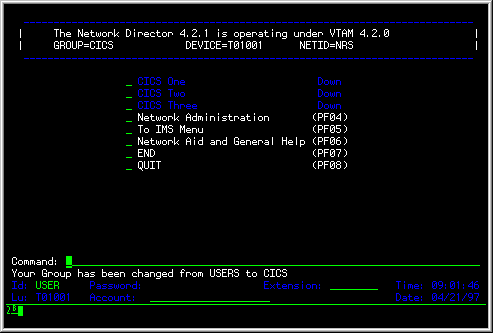
The "desired-group" may be any group name listed in the applicable USER or TERMINAL GROUPS= operand. If the terminal operator enters an authorized GROUP name, the Application Selection Panel will be reconstructed utilizing the characteristics of the new GROUP and message TND0833 is written to the LOG and the affected device.
If the terminal operator requests a GROUP that is not authorized via the applicable GROUPS= operand, TND0832 is issued and the current GROUP remains unaffected.
The terminal operator may request that Network Director return to the default GROUP by simply entering the GROUP command with no operand value.
To illustrate how the new GROUPS logic and GROUP command may be useful, consider the following Configuration Parameters:
APPLICATION CICS1,TARGET=CICS001,TITLE='CICS One'
APPLICATION CICS2,TARGET=CICS002,TITLE='CICS Two'
APPLICATION CICS3,TARGET=CICS003,TITLE='CICS Three'
APPLICATION TOCICS,TARGET=TOCICS,TITLE='To CICS Menu',
         INITIAL-DATA=('GROUP CICS')
*
APPLICATION IMS1,TARGET=IMS001,TITLE='IMS One'
APPLICATION IMS2,TARGET=IMS002,TITLE='IMS Two'
APPLICATION IMS3,TARGET=IMS003,TITLE='IMS Three'
APPLICATION TOIMS,TARGET=TOIMS,TITLE='To IMS Menu',
         INITIAL-DATA=('GROUP IMS')
*
GROUP IMS,APPLICATIONS=(IMS1,IMS2,IMS3,TOCICS)
GROUP CICS,APPLICATIONS=(CICS1,CICS2,CICS3,TOIMS)
GROUP USERS,APPLICATIONS=(CICS1,IMS1,TOCICS,TOIMS)
*
USERS ++++++++,GROUPS=(USERS,IMS,CICS)
|
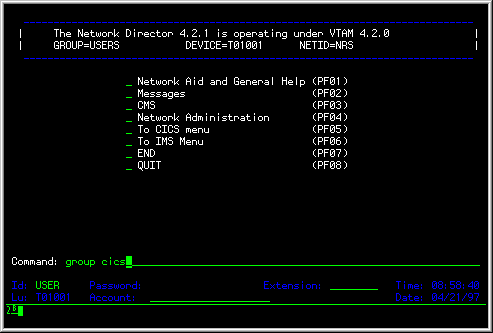
When an individual signs on that is successfully pattern matched with the USERS definition (in this example, everyone will match), they are immediately assigned to the default GROUP of USERS (the first GROUP in the list of GROUPS operands).
|
|
The terminal user can change to a menu consisting of only CICS applications by entering the command "GROUP CICS" or pressing the function key associated with the TOCICS choice on the Application Selection Panel. The CICS GROUP includes the three defined CICS systems, as well as a choice to select a menu of IMS applications.
|
With a little planning, this mechanism can be used to divide your logical applications into a variety of collections (GROUPS) that can make your network much easier to utilize.
Operators with specific authorization needs (designated Network Administrators) or installations with specific authorization requirements should uniquely identify the operators with the USER definition statement. Individual operators (USERs) and their characteristics require definition in order for Network Director to provide proper authorization checking for authorized individuals.
Each operator that has specific requirements should be designated a USER. Note that some generality can be achieved through proper utilization of the Wild Character. Additionally, a USER can automatically become a member of a GROUP. This can allow each GROUP member to be identified by a separate User id/Password combination, but the total GROUP can still be dealt with as a single entity.
Remember that a USER can move from one terminal to the next unless restricted via the TERMINALS= parameter. Note also that the USERS definition provides only a "pattern" to use for a specific set of users within the network. Each network element will extract individual characteristics as it becomes active within Network Director.
You should define specific terminals to Network Director whenever a physical terminal is to be authorized immediately for access and requires more applications than is defined on the DEFAULT statement. Any operator that has access to the physical terminal will be allowed access to the terminal's selections. This is typically used for terminals that are in a secure location and all the individuals in the terminal's proximity are authorized to use it.
Devices that have no matching TERMINALS definition will still be presented with the DEFAULT APPLICATIONS= if the DEFAULT IDENTIFICATION=NO operand is in effect. If IDENTIFICATION=YES is active then the terminal will receive the User id Identification panel. This characteristic implies that you do not have to define each terminal that will utilize Network Director. In this case, simply providing the VTAM LOGAPPL operand is enough to cause Network Director to manage the terminal.
You may want to consider eliminating the terminal's ability to identify itself as a USER. This prohibits the terminal from becoming assigned to a different logical area and then being left. This can be accomplished via the USER=NO operand or ID-AREA=NO and COMMANDS=NO.
Terminals are typically routed to Network Director through utilization of VTAMs PU or LU LOGAPPL operand. As an alternative, you may specify ACQUIRE=YES to instruct Network Director to dynamically obtain the terminal. The parameter for terminal acquisition will have to be present in either VTAM's or Network Director's definitions. In general, North Ridge Software, Inc. recommends the LOGAPPL approach, but either parameter will achieve the same effect.
The ACQUIRE=YES operand prohibits the use of Wild Characters, which will typically increase the number of TERMINAL definitions. However, it may be an alternative you would like to utilize. ACQUIRE=YES is particularly convenient during early testing and prior to actually making the necessary changes in VTAM's definition library. Make sure that you remove the ACQUIRE option when you begin utilizing the LOGAPPL approach to eliminate any potential confusion on the part of ACF/VTAM.
Similar to the USERS statement, the TERMINALS statement defines a pattern (remember the wild characters) that will be used to associated actual network elements with the TERMINALS definition.
The DEFAULT statement contains parameters that are common to all the GROUPs, USERS, and TERMINALS that are active within Network Director. Its most common use is to extend the availability of general applications to all current sessions (reference the following discussion on APPLICATIONS=). It is also the location that the default LOGO for your installation is defined.
Typically, the common Network Director facilities (Message Switching and INFO) are defined as default APPLICATIONS for all operators. You should keep in mind that the applications specified on the DEFAULT statement are in addition to any other applications the operator qualifies for.
The TIMEOUT parameter is especially important to set properly. Network Director considers terminal panels "secure" if they are on a terminal that currently has a USER session active (an operator has identified himself to Network Director). These secure panels will be allowed to remain on the terminal for TIMEOUT seconds before the panel will be reset to the physical terminal's default. The USER session will be automatically terminated (forced LOGOFF).
The TIMEOUT facility has been provided to protect the terminal network from the accidental abandonment of a physical terminal that has been presented with an authorized panel. It can also be controlled at the USERS, GROUP, and TERMINALS level. It is important to set the parameter to an appropriate value. If it is not present, the DEFAULT is no TIMEOUT at all. This means that an authorized panel will never be removed from a terminal by Network Director.
The DEFAULT statement is also where you will want to set the general "mode" of operation (CUA or not). CUA (Common User Access) is a set of definition and operating processes that specifies how panels are to be presented to the user. This specification is intended to provide a similar "look and feel" across different applications in your system. If you would like the CUA principles to apply, set CUA=YES. CUA=NO (the default) provides panels that are a bit more flexible, contain more information, but do not conform to CUA.
NRS recommends that you experiment a little with both modes of operation and then establish a standard for your installation.
The GLOBALS statement controls the systems environment portion of Network Director and does not have any impact on the logical network implementation. Refer to the GLOBALS statement description under GLOBALS for more information.
The subparameter is present on the USER, GROUP, TERMINAL, and DEFAULT parameter statements. It is the mechanism that provides the logical connection between the APPLICATION definitions and the individual operators. The operands of this subparameter will dictate which selections the operator will have on the Application Selection Panel.
Network Director will always use the "most detailed" identity to establish the selections for a specific operator. Thus, if the operator is sitting at a terminal defined with the TERMINAL statement, the Application Selection Panel will contain APPLICATIONS from the TERMINAL and DEFAULT statements. If the operator identifies himself as a USER, the Application Selection Panel will contain APPLICATIONS from the USER, TERMINAL and DEFAULT statements as controlled by the SELECTIONS= operand.
If the operator is currently logged on as a USER and chooses to identify himself as a different USER, Network Director will process a logical logoff of the first USER from the terminal immediately prior to processing the logon of the "new" USER.
Network Director has no maximum of allowable APPLICATIONS. You can define as many as required for the particular USER, TERMINAL, or GROUP. Network Director will fill the Application Selection Panel with as many as can fit on the panel. If the non-CUA network user still has applications available, they can be viewed by simply striking the ENTER key. The PFKEYs may be used also, provided that F7 and F8 are not also assigned to APPLICATION selections. The terminal operator will have to exercise some care when using PFKEYs. They will be generally reassigned for each "page" of selections.
The CUA terminal user can also use the Bkwd (F7) and Fwd (F8) commands to page through the selection menu. This paging operation will continue until the operator has exhausted the authorized APPLICATIONS, at which point the Application Selection Panel will return to the first panel again.
Whether the APPLICATION is displayed or not, the terminal operator can select the APPLICATION by typing the APPLICATION NAME. Dynamic status updates for APPLICATIONs not currently displayed will cause no activity on the panel.
The PROFILE statement [Known as the Options for CUA mode users. ] allows you to assign basic operational characteristics to a particular USER, GROUP, or TERMINAL. The primary decision that must be made during the definition process is whether the network users will be allowed to modify their Profile or not. If they will be allowed to modify it, the Network Administrator will not be required to set the Profile contents exactly.
However, if the network users will not be allowed to change their Profile contents. The network definitions must contain the proper settings for each USER, GROUP, and TERMINAL.
Network Director's network definitions provides you with a wide variety of definitions with which to define your logical terminal network. The construction of the network definitions should follow the logical process discussed previously.
The network definitions are likely to require changes as your terminal network grows. For this reason, you should carefully plan the relationships represented by the definitions.
Except for a few of the GLOBALS subparameters, all of the parameters and subparameters present in the network definitions are modifiable during Network Director's execution. However, these changes will not be saved to the next execution unless you specifically SAVE them.
To summarize the Configuration Parameter planning tasks:
|
Remember that the USERS and TERMINALS definitions provide a pattern for defining USERs and TERMINALs. If the definition contains no Wild Characters, it defines a pattern that will be used by only one network element at a time, but it is still a pattern to be merged with the DEFAULT and GROUP statements. When a new network element is encountered by Network Director the network element's characteristics are drawn from the most detailed definitions (USERS and TERMINALS) first, the GROUP definition second, and finally, the DEFAULT definition.
Once the VTAM Definition and Network Director network definition planning activities are complete, you can begin implementation of the logical networks. This portion of the planning effort discussion offers some general comments on the alternatives available to you to accomplish the migration.
This portion of the planning discussion should provide you with some ideas on how you can implement Network Director and its concepts in your environment. This discussion is, of necessity, general in nature and should be adjusted according to the specific needs of your environment.
For the purposes of this discussion, migration is the term used to indicate those activities that a Network Administrator has to go through to convert terminals from the existing method of computing facility access to Network Director's general philosophy.
Migration is typically a gradual process. Portions of an existing network are usually migrated individually. This allows a minimum of disruption in the event of an unanticipated error.
Generally, it is a good policy to initialize Network Director with your entire logical network definition. The network definitions often have many internal relationships and any attempt on your part to "split" the network definitions at various migration points may inadvertently affect the relationships.
Initializing Network Director with the fully defined network allows you to concentrate on the effect of the migration on the terminal operators and the full computing facility without the constant need to update the Configuration Parameters. However, do not hesitate to modify the Configuration Parameters to better serve your needs as migration proceeds.
If the entire network is new or under significant expansion, the effort to convert or migrate is greatly simplified. Remember to make the proper documentation available to the terminal operators for the facilities they will be using. The selection process within Network Director is relatively simple to use, but if the operator will be using INFO or the Message Facility extensively, the Network User's Guide should be available.
It is more likely that you have an existing terminal network and will be interested in identifying specific portions to migrate. Usually there will be one or more specific user groupings that have the most urgent need for the new facilities. Obviously, they are good candidates for migration. They are more likely to be willing to assist in the refinement of the network definitions for improved usage characteristics.
It is also usual that one or more GROUPs of individual operators will stand out as likely early migration candidates. The data processing staff itself can be dealt with as such a group. Perhaps only particular subsets like a particular development group, or possibly systems programming are likely candidates.
The logical network's definitions must be validated as early during migration as possible. The ideal situation is that as individuals and groups are migrated, the logical network they are migrating into is stable (in terms of their view of the network). Network Director is about improving the end user's interface to the computing facility. If the logical definitions do not match the end user's needs, then this goal is sacrificed.
When you have decided to migrate a particular group of users or terminals, you will typically be assigning ownership of the terminals to Network Director in one of two manners. Either the VTAM LOGAPPL definition or Network Director's ACQUIRE=YES parameter will be necessary for Network Director to manage the terminal (do not use both techniques at the same time on the same device).
To test the network definition for a particular terminal, you can leave both of these parameters off. To activate Network Director simply issue the standard VTAM USS commands from the terminal to LOGON to Network Director. This presumes that the appropriate entries have been made for Network Director in VTAM's USS tables. A functioning Network Administrator terminal may also issue Network Director's SIMLOGON operator command to duplicate this activity from within Network Director.
These techniques will enable you to test the Application Selection Panel for the terminal and to utilize any authorized Network Director facilities. However, when you cause Network Director to transfer your terminal to a target subsystem (via the Application Selection Panel), Network Director will release your terminal and will not recover it once your session with the target subsystem is complete.
As an alternative, you can modify a particular terminal's characteristics within Network Director by issuing a Network Administrator TERMINAL ACQUIRE=YES command for the target terminal. This will cause Network Director to modify the specified terminal's internal control block to indicate that Network Director should issue the VTAM SIMLOGON function for the device. To actually acquire the device the first time, you should issue the Network Administrator's SIMLOGON command. Thereafter, Network Director will manage the device exactly as if you had initialized Network Director with the ACQUIRE option specified.
The preceding techniques will allow you to test a logical definition on an experimental basis. Full migration on a production basis will not take effect until you actually modify the network definitions.
Migration to Network Director is primarily one of accepting the logical network concepts. This can be achieved using many different approaches. The following list represents one of the approaches.
The Network Administration panel is the basic panel that an authorized operator will use to access the Network Administrator defined functions. It is reached from the Application Selection Panel and is authorized exactly like any other "application" in the network definitions.
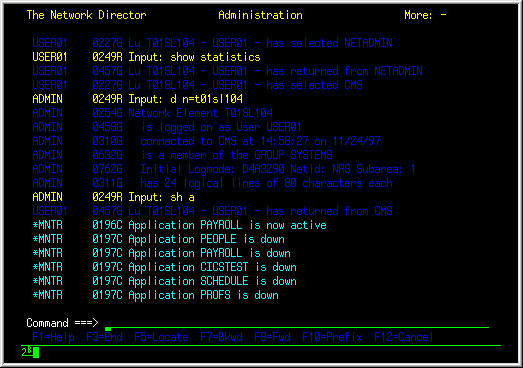
The following information discusses in detail each of the Network Administrator's available functions. The Network Administrator panel can be portrayed as:
|
The Network Administrator can return to the Application Selection Panel by striking the CLEAR key, typing the Primary Commands END or CANCEL, or pressing a PFKEY that has been assigned one of these values. To utilize one of the Network Administrator functions, simply enter text commands on the Primary Command line or utilize the standard Network Director Program Function Keys.
The information to be displayed can be controlled via use of the PREFIX command (see The PREFIX Command). The data in the LOG can be searched sequentially via usage of the LOCATE command (see The LOCATE Command).
The Network Administrator's panel will automatically display the most recent contents of Network Director's LOG file. You can manipulate this file display by entering the Bkwd or Fwd commands (default PF07 and PF08) or the ALL command.
The Pfkeys can be used to move the display forward or backward in the LOG. This mechanism allows the Network Administrator to diagnose problems occurring within the logical network or to simply monitor activity.
Network Director's online LOG file is a circular storage queue. The buffer size is controlled via the LOGSIZE operand on the GLOBALS statement. If the LOG buffer is small, you may want to restrict entries in the LOG to those that you consider important. The LOG operand of the GLOBALS statement allows the Network Administrator to manage the class of messages that are logged into the buffer. The message classes are described in further detail in the Message and Codes manual.
A Network Administrator can also place the Network Administration panel into an automatic update mode by entering the Primary Command MONITOR. This will cause the Network Administration panel to be automatically updated whenever a non trace message is placed into the LOG by any activity within Network Director. Monitor Mode can be terminated by striking any AID key other than ENTER or issuing the RESET primary command.
The left portion of the Network Administrator panel contains either the time of day or a network element name associated with the LOG entry. The Network Administrator can alternate between the standard display of this area and all "times" by issuing the PREFIX command (default PF10).
Network Director contains a general purpose command intended to allow the Network Administrator to selectively choose elements from a list for display. The ALL command allows the terminal operator (normally, a Network Administrator) to use one or more operands (delimited by any character desired) combined via boolean logical operations to select items.
Each argument must be delimited by a character, which is specified as the first and last character of the string. [The first character of the first argument in the ALL command is accepted as the delimiter for all the arguments in a single ALL command. ]
The general syntax of ALL is: [The ALL command is not case sensitive. ]
|
ALL arg1 [ {AND|OR} {NOT} arg2 ] ...
|
Thus, specific messages associated with a particular device could be selected from the LOG display by issuing: ALL "T01005"
The double quotes are the delimiters that cause ALL to create a display of any messages that has the string T01005 associated with it.
You can utilize multiple operands by adding the appropriate keyword operators between arguments, as provided for in the ALL syntax. Entering ALL with no operands resets the current ALL criteria to the null condition (all elements will be included again).
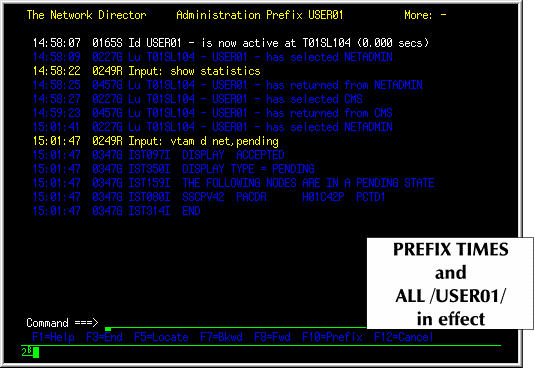
When viewing the Network Administration log, [The ALL command can also be used on SHOW list type panels to "subset" the list of elements. ] the Network Administrator may issue the ALL command to select a portion of the LOG for viewing. This alternative to the PREFIX command is more general purpose and allows the specification of multiple criteria (PREFIX allows only pattern matching to select elements).
The Administrator's ALL command searches the LOG for messages that contain the specified criteria and presents them for display to the Network Administrator. ALL and PREFIX are mutually exclusive for selecting messages for display (PREFIX can still be used to control the format of the prefix area).
|
ALL scans each Log Buffer Entry (LBE) in storage and, as a result, can be utilized to select any message for a specific device or userid. However, the LBE does not contain the time, date, or message number in EBCDIC form and ALL cannot locate messages using these values.
The PREFIX command offers the following options:
|
PREFIX {pattern|STANDARD|TIMES|LUNAMES|DATES|NONE|#nnnn}
|
When a PREFIX pattern is in effect, the upper right hand corner of the Network Administration panel will contain the pattern in effect instead of Network Administration. An example of the PREFIX command usage is in the Network Operator's Guide under "Isolating Activity".
The LOCATE command is also active and will search forward in the LOG display for a character string. You can issue the LOCATE command by entering LOCATE, SEARCH, or FIND as a primary command on the command line and following it with the character string you are searching for. Alternatively, the CMS LOCATE syntax of a single slash "/" will also function as a LOCATE command.
===> /datastring/ |
The search will proceed forward from the current position in the LOG and will stop at the first data line that contains the specified character string of "datastring". The LOCATE pfkey (default PF5) will repeat the last LOCATE function.
Network Director provides a mechanism to control and monitor the logical and physical network. There are a variety of keyword commands that can be used to interrogate the status of an existing portion of the defined network (the Configuration Parameter definitions), dynamically allocated items and the current status (see Network Reporting), and to operate on portions of the system (RELEASE, HOLD, DELETE, etc.)
The commands can be issued from the primary command line of the Network Administration panel and are documented in their entirety in the Network Operator's Guide.
You may also enter the GLOBALS command from the command line (other Configuration Parameter definitions are manipulated via the SHOW command) or the operating system console (OS Stop/Modify, GCS WTOR, DOS MSG). The ability to enter the GLOBALS command allows you to set key operating system level elements while attempting to recover from unusual situations that may arise in your system.
If Network Director has been authorized to operate as a VTAM Program Operator (APPL AUTH=SPO and GLOBALS VTAMOPER=YES), then the Network Administrator can issue any valid VTAM command from the Primary Command line. All such commands must be prefixed with the text string VTAM in order for Network Director to recognize it as a VTAM operator command.
The result of the command will be displayed in the Display Area exactly as would any other Network Director message. The message "reply" is susceptible to message class controls exactly as any other message would be.
The last input entered by the Network Administrator can be restored to the LOG display's command line by execution of the RETRIEVE command. This provides a mechanism to quickly correct any data entry that has had a slight error.
The RETRIEVE command is most useful when associated with a PFKEY or PAKEY in the individual Network Administrator's Profile (use the PROFILE command to select the PFKEY).
The Network Administrator can also request multiple reports and displays that provide information about the status and make up of the network. This reporting facility is intended to aid the Network Administrator in understanding the characteristics of the logical network while the network is active.
The reporting facility is provided through Network Director's DISPLAY command. Its general format is:
DISPLAY

    [ ACTIVE ]
    [ APPLICATIONS [ =application name ] ]
    [ AUTOLOGOFF ]
    [ BROADCASTS ]
    [ CHAINS ]
    [ COUNTS ]
    [ DEFAULTS ]
    [ DFBS ]
    [ ERRORS ]
    [ EXITS ]
    [ FILE-IO ]
    [ GLOBALS ]
    [ GROUPS [ =group name ] ]
    [ HELD ]
    [ INACTIVE ]
    [ INTERVAL ]
    [ ITERATION ]
    [ MEMOS ]
    [ MESSAGES ]
    [ MODULES ]
    [ NETID={++++++++|alpha pattern} ]
    [ NETWORK-ELEMENTS [=network element name ] ]
    [ NOAUTOLOGOFF ]
    [ NOTES ]
    [ PROFILES [ =profile name ] ]
    [ PTFS ]
    [ REJECT ]
    [ SAVED [ =(setname,version) ] ]
    [ SECURITY ]
    [ SITES [ =site name ] ]
    [ STORAGE ]
    [ SUBAREA=numeric value ]
    [ TERMINALS [ =terminal name ] ]
    [ USERS [ =user name ] ]
    [ ZAPS ]
|
any of the =xxx operands may be specified with Wild Characters.
When an operand is specified as a positional value, you will receive an Overview of the specific area you have request a display on. E.G. DISPLAY APPLICATIONS will produce a single line for each defined APPLICATION and its current status.
When an operand is specified as a keyword (operand=value), you will receive a specific display for the network entity you are displaying. The format will be similar to the syntax required in the Configuration Parameters to define the entity. To conserve space in the LOG display queue, operands will generally only be displayed if their setting is something other than the default.
This DISPLAY operand may also be used in conjunction with APPLICATION=, TERMINALS=, USERS=, or NETWORK-ELEMENTS= to qualify the display further. Contrast this with NOAUTOLOGOFF.
This DISPLAY operand may also be used in conjunction with APPLICATION=, TERMINALS=, USERS=, or NETWORK-ELEMENTS= to qualify the display further. Contrast this with AUTOLOGOFF.
DISPLAY SECURITY,HELD,ITERATION |
shows all devices that are on the Inactive List that are not eligible for automatic release because of security violations, operator HOLD commands, or consecutive session failures.
TND0249G Input: DISPLAY NETWORK,SUBAREA=1,NETID=NRS+++ TND0764G T01001 - active from Subarea: 1 Netid: NRS TND0764G T01005 - USER1 active from Subarea: 1 Netid: NRS TND0764G T01015 - USER3 active from Subarea: 1 Netid: NRS |
TND0249G Input: display saved TND0728G SAVED Control Block Records TND0729G Name=DIRECTOR,Version=0 TND0729G Name=DIRECTOR,Version=1 TND0729G Name=DIRECTOR,Version=2 TND0729G Name=DIRECTOR,Version=4 TND0729G Name=TEST ,Version=0 |
Specifying the saved name displays a single line for each definition within the identified set (without regard for version). Using the version portion of the SAVED= operand causes only definitions from the specified version to be displayed.
TND0249G Input: display saved=test TND0728G SAVED Control Block Records TEST TND0730G USER TEST ++++++++ TND0730G USER TEST2 ++++++++ TND0249G Input: display saved=(director,2) TND0728G SAVED Control Block Records DIRECTOR 2 TND0730G APPLICATION ADMIN TND0730G TERMINAL OPERATOR ++++++++ TND0730G USER ++++++++ ++++++++ |
This information can also be obtained by using the TNDUTIL batch program as discussed in External File Maintenance (DISPLAY/DELETE).
The DISPLAY command has three basic types of requests. They are called Overview, Specific, and Combined Displays. Network Director will categorize your report request based upon the number of DISPLAY operands you have used.
The first request type is called an Overview Display and will address general requests of Network Director. This request will have only a single operand and the operand will have no supplied argument value.
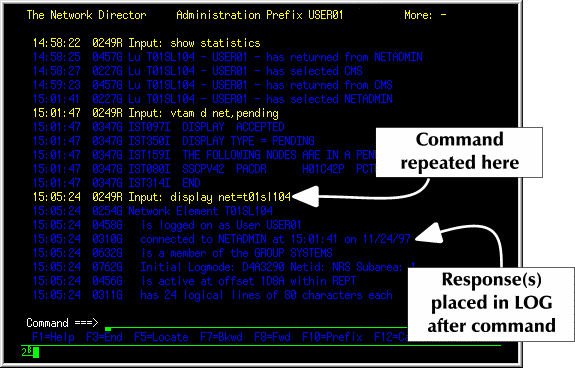
|
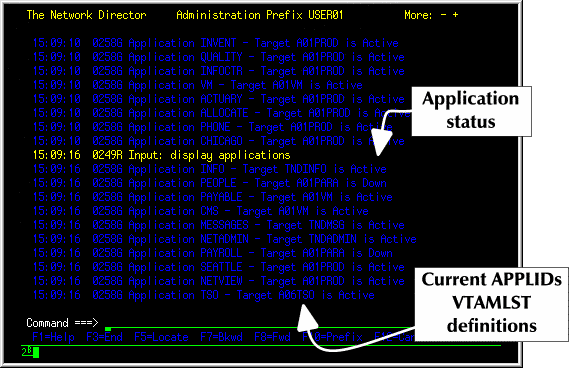
|
The second type is called a Specific Display and will produce displays showing the single dimensional values present in a Network Director control block. The control block values are typically set via network definition efforts. Thus, the Network Administrator can use Specific Displays to query the attributes associated with a particular network entity. Network Director's Wild Character is valid.
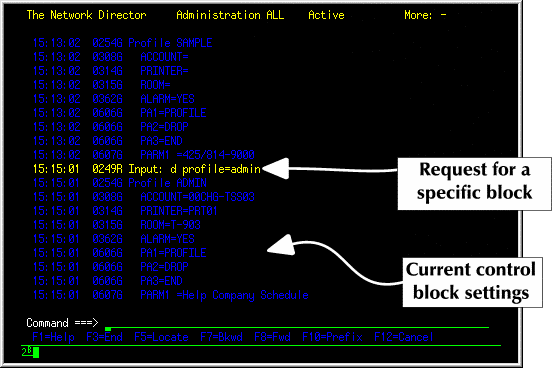
|
The following example is a command typically used by an installation HELP desk to interrogate details associated with a device. This would be used where the user's id is known and the HELP desk personnel are interested in more information about what device the user is on and what status it is in.
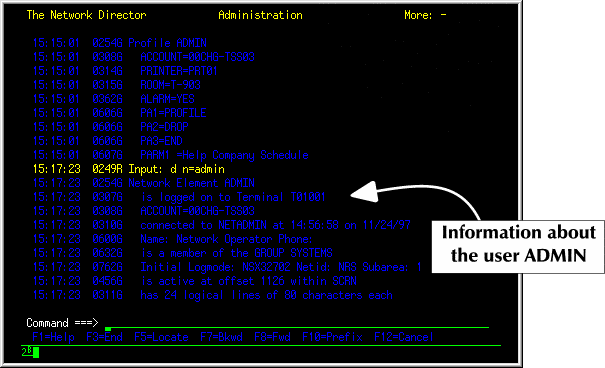
|
The third type of Display Type is called a Combined Display. It will have two or more valid Display operands and will produce differing reports depending upon the combination.
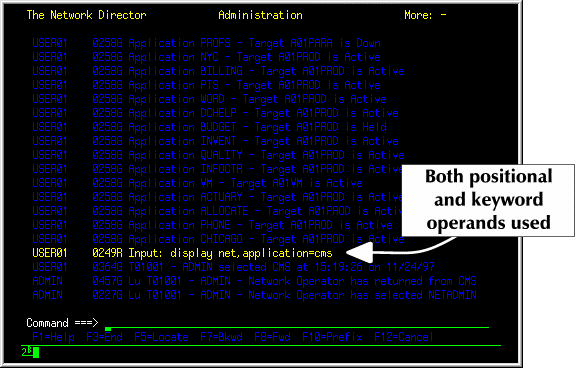
|
Consult the Network Operator's Guide (TND-0210) for additional information and examples.
Network Director can also provide data associated with events occurring within its partition/address space. This is termed Event Recording. To activate this, specify the GLOBALS EVENTS= operand with the appropriate values to cause Network Director to produce the SMRs (System Measurement Record) for OS systems and the SARs (System Accounting Record) for DOS, GCS, or OS systems. The exact medium used to record the events is dependent upon the operating environment that Network Director is executing in. Reference the Installation Guide under Supported Accounting Operands for the specific operating system Network Director is operating in for additional information.
The following descriptions are intended to provide additional information about the contents of the SMRs and SARs. Any additional overhead introduced by the operating environment is in addition to the SMR or SAR fields (e.g., OS SMF Header, etc.).
SARs are 80 character accounting records that are operating system independent. That is, the SAR from a Network Director in DOS can be merged with SARs from GCS and/or OS systems to produce a single file that can be processed on the system accomplishing the merge process. SMRs are variable length and can be effectively recorded only in an OS SMF environment. Because of the general characteristic of operating system portability, NRS recommends use of the SAR format. However, both the SMR and SAR formats are discussed in this section.
SMR      DSECT                         Director's SMR Record
*
*        Network Director's SMR Header Record Description
*
SMRTYPE  DS    H                 Director SMR Record Type
SMRPUSER EQU   0                   Reserved for installation
SMRPRET  EQU   4                   EVENT=RETURN
SMRPLOGN EQU   8                   EVENT=LOGON
SMRPLOGF EQU   12                  EVENT=LOGOFF
SMRPAPPL EQU   16                  EVENT=APPLSTAT
SMRPVTAM EQU   20                  EVENT=VTAMERRS
SMRPIUPD EQU   24                  EVENT=INFOUPD
SMRPACNT EQU   28                  EVENT=APPLCNTS
SMRPMSND EQU   32                  EVENT=MSGSEND
SMRPMDEL EQU   36                  EVENT=MSGDEL
SMRPMPRT EQU   40                  EVENT=MSGPRINT
SMRPMVIW EQU   44                  EVENT=MSGVIEW
SMRPACMD EQU   48                  EVENT=ADMINCMD
SMRPSLCT EQU   52                  EVENT=SELECT
*
*        Demographics
*
SMRPID   DS    CL8                 Id of the user (if present)
SMRPLU   DS    CL8                 VTAM LU Name (from NIB)
SMRPDATE DS    PL4                 Calendar Date
SMRPTIME DS    Pl4                 Time EVENT Occurred
SMRPDIR  DS    CL8                 Director's APPLID
SMRPVRS  DS    CL3                 Director Version Number
         DS    CL13                reserved
SMRPVAR  EQU   *                   variable portion start
|
SAR      DSECT                Director's SAR Record
*
*        Network Director's SAR Header Record Description
*
SARPNAME DS    CL8              Director'S IDENTIFIER
SARPTYPE DS    H                Director SAR Record Type
SARPUSER EQU   0                   Reserved for installation
SARPRET  EQU   4                   EVENT=RETURN
SARPLOGN EQU   8                   EVENT=LOGON
SARPLOGF EQU   12                  EVENT=LOGOFF
SARPAPPL EQU   16                  EVENT=APPLSTAT
SARPVTAM EQU   20                  EVENT=VTAMERRS
SARPIUPD EQU   24                  EVENT=INFOUPD
SARPACNT EQU   28                  EVENT=APPLCNTS
SARPMSND EQU   32                  EVENT=MSGSEND
SARPMDEL EQU   36                  EVENT=MSGDEL
SARPMPRT EQU   40                  EVENT=MSGPRINT
SARPMVIW EQU   44                  EVENT=MSGVIEW
SARPACMD EQU   48                  EVENT=ADMINCMD
SARPSLCT EQU   52                  EVENT=SELECT
*
SARPVRS  DS    XL1               Director Version Number
SARPV230 EQU   23                  2.3.0
         DS    XL1               RESERVED
SARPID   DS    CL8               Id of the user (if present)
SARPLU   DS    CL8               VTAM LU Name (from NIB)
SARPDATE DS    PL4               Calendar Date
SARPTIME DS    PL4               Time EVENT Occurred
SARPVAR  EQU   *                 variable portion start
|
This information is present in the front of every event type produced by Network Director. Information in the SMR or SAR past the header is dependent upon the EVENT type being produced.
The full DSECT is available on Network Director's Source Library via the ASSEMBLER Macro TNDSMR or TNDSAR. Network Director does not currently provide any manner with which to further reduce the data represented by the SMF record.
SMR or SAR header fields can be further defined as follows (where the first three bytes of the field can be SMR or SAR to identify the record where they reside).
The ADMINCMD Event is recorded whenever a Network Administrator has issued a command via Network Administration.
The SMRPVAR layout is:
SMRMCMD DS CL11 Command being issued SMRMOBJ DS H DUMP object SMRMADB DS CL8 APPLICATION SMRMUDB DS CL8 USERS SMRMTDB DS CL8 TERMINALS SMRMGDB DS CL8 GROUP SMRMNEL DS CL8 NETWORK-ELEMENTS SMRMSDB DS CL8 SITE SMRMPDE DS CL8 PROFILE SMRMEXT DS CL8 EXTENSION SMRMDFB DS CL16 DFB SMRMTEXT DS CL72 Command Text SMRMSIZE EQU *-SMRHSIZE Size of ADMINCMD format |
The SARPVAR layout is:
SARMCMD DS CL11 Command being issued SARMOBJ DS H DUMP object SARMTEXT DS CL27 Command Text SARMSIZE EQU *-SMRPSTRT Size of ADMINCMD format |
Each of the ADMINCMD Fields can be further defined as follows:
The APPLCNTS Event is recorded once an hour for each defined APPLICATION that has at least one network element connected to it.
The SMRPVAR layout is:
SMRCAPPL DS CL8 APPLICATION Name SMRCTRGT DS CL8 VTAM APPLID SMRCUSER DS F Number of USERS connected SMRCTERM DS F Number of TERMINALS connected SMRCMAX DS F MAXIMUM= SMRCSIZE EQU *-SMRHSIZE Size of APPLCNTS format |
The SARPVAR layout is:
SARCAPPL DS CL8 APPLICATION Name SARCTRGT DS CL8 VTAM APPLID SARCUSER DS F Number of USERS connected SARCTERM DS F Number of TERMINALS connected SARCMAX DS F MAXIMUM= SARCSIZE EQU *-SMRPSTRT Size of APPLCNTS format |
Each of the APPLCNTS Fields can be further defined as follows:
The APPLSTAT Event is recorded each time a defined APPLICATION changes status.
The SMRPVAR layout is:
SMRASTAT DS H New status SMRAHELD EQU 4 Held SMRAWAIT EQU 8 Wait SMRAACT EQU 12 Active SMRADOWN EQU 16 Down SMRANAME DS CL8 APPLICATION Name SMRATRGT DS CL8 VTAM APPLID SMRASIZE EQU *-SMRHSIZE Size of APPLSTAT format |
The SARPVAR layout is:
SARASTAT DS H New status SARAHELD EQU 4 Held SARAWAIT EQU 8 Wait SARAACT EQU 12 Active SARADOWN EQU 16 Down SARANAME DS CL8 APPLICATION Name SARATRGT DS CL8 VTAM APPLID SARASIZE EQU *-SMRPSTRT Size of APPLSTAT format |
Each of the APPLSTAT fields can be further defined as follows:
The INFOUPD Event is recorded each time a network user updates a Information file record (either a INFO topic or an Index record).
The SMRPVAR layout is:
SMRUFLAG DS H Update Type SMRUHDE EQU 4 INFO Screen SMRUHIX EQU 8 INFO Index SMRUSCRN DS CL5 Screen or Index level updated SMRUSIZE EQU *-SMRHSIZE Size of INFOUPD format |
The SARPVAR layout is:
SARUFLAG DS H Update Type SARUHDE EQU 4 INFO Screen SARUHIX EQU 8 INFO Index SARUSCRN DS CL5 Screen or Index level updated SARUSIZE EQU *-SMRPSTRT Size of INFOUPD format |
Each of the INFOUPD fields can be further defined as follows:
The LOGOFF Event is recorded each time a network user is logged off of Network Director.
The SMRPVAR layout is:
SMRFFLAG DS H LOGOFF Event type SMRFCMD EQU 4 Terminal User initiated SMRFTIME EQU 8 USER timed out SMRFOP EQU 12 Administrator forced LOGOFF SMRFAUTO EQU 16 AUTOLOGOFF occurred SMRFDROP EQU 20 Terminal user issued DROP SMRFSSI EQU 24 SSI caused LOGOFF SMRFACCT DS CL8 Account code SMRFEXT DS CL8 Extension value SMRFSIZE EQU *-SMRHSIZE Size of LOGOFF format |
The SARPVAR layout is:
SARFFLAG DS H LOGOFF Event type SARFCMD EQU 4 Terminal User initiated SARFTIME EQU 8 USER timed out SARFOP EQU 12 Administrator forced LOGOFF SARFAUTO EQU 16 AUTOLOGOFF occurred SARFDROP EQU 20 Terminal user issued DROP SARFSSI EQU 24 SSI caused LOGOFF SARFACCT DS CL8 Account code SARFEXT DS CL8 Extension value SARFSIZE EQU *-SMRPSTRT Size of LOGOFF format |
Each of the LOGOFF fields can be further defined as follows:
The LOGON Event is recorded each time a terminal user attempts to identify himself (whether successful or not).
The SMRPVAR layout is:
SMRNFLAG DS H LOGON Event type SMRNOK EQU 4 Successful LOGON SMRNPSWD EQU 8 Password not matched SMRNSEC EQU 12 Security System rejected SMRNAIE EQU 16 Outside TIME or DAY SMRNHELD EQU 20 Network Element HELD SMRNATE EQU 24 At the wrong TERMINAL SMRNMAX EQU 28 MAXIMUM= exceeded SMRNVPSW EQU 32 VERIFY didn't work SMRNNPSW EQU 36 NEW-PSWD attempt SMRNAUTH EQU 40 AUTHENTICATION failed SMRNTRY DS H Attempt number SMRNACCT DS CL20 Account SMRNEXTN DS CL8 Extension SMRNSIZE EQU *-SMRHSIZE Size of LOGON format |
The SARPVAR layout is:
SARNFLAG DS H LOGON Event type SARNOK EQU 4 Successful LOGON SARNPSWD EQU 8 Password not matched SARNSEC EQU 12 Security System rejected SARNAIE EQU 16 Outside TIME or DAY SARNHELD EQU 20 Network Element HELD SARNATE EQU 24 At the wrong TERMINAL SARNMAX EQU 28 MAXIMUM= exceeded SARNVPSW EQU 32 VERIFY didn't work SARNNPSW EQU 36 NEW-PSWD attempt SARNAUTH EQU 40 AUTHENTICATION failed SARNTRY DS H Attempt number SARNACCT DS CL20 Account SARNEXTN DS CL8 Extension SARNSIZE EQU *-SMRPSTRT Size of LOGON format |
Each of the LOGON fields can be further defined as follows:
The MSGDEL Event is recorded whenever a network user has Deleted a message within the Message Facility.
The SMRPVAR layout is:
SMRDTYPE DS H Type of message SMRDCAST EQU 4 Broadcast SMRDMEMO EQU 8 Memo SMRDNOTE EQU 12 Note SMRDDEST DS CL8 Destination SMRDORIG DS CL8 Origin SMRDNAME DS CL8 Message Name SMRDLEN DS H Length of the message SMRDSIZE EQU *-SMRHSIZE Size of MSGDEL format |
The SARPVAR layout is:
SARDTYPE DS H Type of message SARDCAST EQU 4 Broadcast SARDMEMO EQU 8 Memo SARDNOTE EQU 12 Note SARDDEST DS CL8 Destination SARDORIG DS CL8 Origin SARDNAME DS CL8 Message Name SARDLEN DS H Length of the message SARDSIZE EQU *-SMRPSTRT Size of MSGDEL format |
Each of the MSGDEL Fields can be further defined as follows:
The MSGPRINT Event is recorded whenever a network user has Printed a message within the Message Facility.
The SMRPVAR layout is:
SMRTTYPE DS H Type of message SMRTCAST EQU 4 Broadcast SMRTMEMO EQU 8 Memo SMRTNOTE EQU 12 Note SMRTDEST DS CL8 Destination SMRTORIG DS CL8 Origin SMRTNAME DS CL8 Message Name SMRTPRTR DS CL8 Where it was printed SMRTLEN DS H Length of the message SMRTSIZE EQU *-SMRHSIZE Size of MSGPRINT format |
The SARPVAR layout is:
SARTTYPE DS H Type of message SARTCAST EQU 4 Broadcast SARTMEMO EQU 8 Memo SARTNOTE EQU 12 Note SARTDEST DS CL8 Destination SARTORIG DS CL8 Origin SARTNAME DS CL8 Message Name SARTPRTR DS CL8 Where it was printed SARTLEN DS H Length of the message SARTSIZE EQU *-SMRPSTRT Size of MSGPRINT format |
Each of the MSGPRINT Fields can be further defined as follows:
The MSGSEND Event is recorded whenever a network user has Sent a message within the Message Facility.
The SMRPVAR layout is:
SMRSTYPE DS H Type of message SMRSCAST EQU 4 Broadcast SMRSMEMO EQU 8 Memo SMRSNOTE EQU 12 Note SMRSDEST DS CL8 Destination SMRSNAME DS CL8 Message Name SMRSLEN DS H Length of the message SMRSSIZE EQU *-SMRHSIZE Size of MSGSEND format |
The SARPVAR layout is:
SARSTYPE DS H Type of message SARSCAST EQU 4 Broadcast SARSMEMO EQU 8 Memo SARSNOTE EQU 12 Note SARSDEST DS CL8 Destination SARSNAME DS CL8 Message Name SARSLEN DS H Length of the message SARSSIZE EQU *-SMRPSTRT Size of MSGSEND format |
Each of the MSGSEND Fields can be further defined as follows:
The MSGVIEW Event is recorded whenever a network user has Viewed a message within the Message Facility.
The SMRPVAR layout is:
SMRWTYPE DS H Type of message SMRWCAST EQU 4 Broadcast SMRWMEMO EQU 8 Memo SMRWNOTE EQU 12 Note SMRWDEST DS CL8 Destination SMRWORIG DS CL8 Origin SMRWNAME DS CL8 Message Name SMRWLEN DS H Length of the message SMRWSIZE EQU *-SMRHSIZE Size of MSGVIEW format |
The SARPVAR layout is:
SARWTYPE DS H Type of message SARWCAST EQU 4 Broadcast SARWMEMO EQU 8 Memo SARWNOTE EQU 12 Note SARWDEST DS CL8 Destination SARWORIG DS CL8 Origin SARWNAME DS CL8 Message Name SARWLEN DS H Length of the message SARWSIZE EQU *-SARPSTRT Size of MSGVIEW format |
Each of the MSGVIEW Fields can be further defined as follows:
The RETURN Event is recorded each time a network element returns to Network Director's control after having been sent to a subsystem.
The SMRPVAR layout is:
SMRRTRGT DS CL8 Target's VTAM APPLID SMRRACCT DS CL20 Account SMRREXT DS CL8 Extension SMRRAPPL DS CL8 Logical Application Name SMRRSTRT DS PL4 Time of selection SMRREND DS PL4 Time of return SMRRTIME DS F Duration (in seconds) SMRRSIZE EQU *-SMRHSIZE Size of RETURN format |
The SARPVAR layout is:
SARRACCT DS CL20 Account SARRAPPL DS CL8 Logical Application Name SARRSTRT DS PL4 Time of selection SARREND DS PL4 Time of return SARRTIME DS F Duration (in seconds) SARRSIZE EQU *-SARPSTRT Size of RETURN format |
Each of the RETURN fields can be further defined as follows:
The SELECT Event is recorded each time a network element selects a subsystem.
The SMRPVAR layout is:
SMRLTRGT DS CL8 Target's VTAM APPLID SMRLACCT DS CL20 Account SMRLEXT DS CL8 Extension SMRLAPPL DS CL8 Logical Application Name SMRLSTRT DS PL4 Time of selection SMRLSIZE EQU *-SMRHSIZE Size of RETURN format |
The SARPVAR layout is:
SARLTRGT DS CL8 Target's VTAM Applid SARLACCT DS CL20 Account SARLAPPL DS CL8 Logical Application Name SARLSTRT DS PL4 Time of selection SARLSIZE EQU *-SARPSTRT Size of RETURN format |
Each of the RETURN fields can be further defined as follows:
The VTAMERRS Event is recorded each time a VTAM based RPL receives a non zero condition (non zero RTNCD or unexpected Sense codes).
The SMRPVAR layout is:
SMRVCMD DS CL8 Type of RPL or SNA Command SMRVRTN DS F RTNCD SMRVFD DS F FDBK SMRVFD2 DS F FDBK2 SMRVCAT DS F Sense Category SMRVMOD DS F Sense Modifier SMRVUSER DS F User Sense SMRVSIZE EQU *-SMRHSIZE Size of VTAMERRS format |
The SARPVAR layout is:
SARVCMD DS CL8 Type of RPL or SNA Command SARVRTN DS F RTNCD SARVFD DS F FDBK SARVFD2 DS F FDBK2 SARVCAT DS F Sense Category SARVMOD DS F Sense Modifier SARVUSER DS F User Sense SARVSIZE EQU *-SARPSTRT Size of VTAMERRS format |
Each of the VTAMERRS fields can be further defined as follows: